Feedback and suggestions

'favourites' tab/page

I haven't ever used this feature before but reading a story yesterday, I wanted to 'save' it to finish later. I marked it as a favourite but when I went to view my favourites it wasn't there. I went back to the story manually and tried to 'favourite' it again by clicking the heart, it told me that it was already added to my favourites. (I went *back* to my favourites again to double check, and it wasn't there!)

Not sure if this is a known issue already?
7 hours

'favourites' tab/page

Hi,

Can I just check that you looked in the correct tab? I'm only asking because if it's saying the story has already been saved to your favourites, it's strange that it wouldn't be showing.

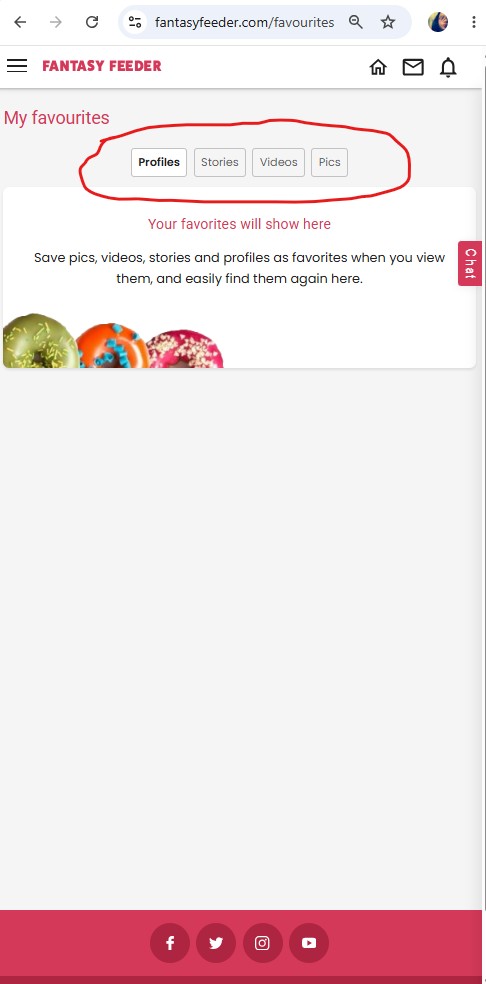
On the My Favourites page, there are separate tabs for Favourite Profiles, Favourite Pics, Favourite Videos, and Favourite Stories.

When you first open the My Favourites page, it automatically displays the Profiles tab. Could you please click on the Stories tab (second tab / button near the top of the page)and let me know if the story appears there?

Thanks!
c00kie
FF Team
7 hours

'favourites' tab/page

If it helps, I’m also having this problem! smiley
6 hours

'favourites' tab/page

Piggyfeedee24:
If it helps, I’m also having this problem! smiley


The My Favourites page has four different sections: Favourite Profiles, Favourite Stories, Favourite Pics, and Favourite Videos. When you first open My Favourites, it defaults to the Favourite Profiles tab.

Could you please make sure you're checking the tab that matches the type of content you favourited? For example, if you favourited a story, please check the Favourite Stories tab.

I've tested this on my end, and it's working correctly for me, so I'd just like to confirm we're looking in the same place. Please see the image below and where you can see the different favourite tabs for each content at the top of the page (circled in red).

Thanks!
c00kie
FF Team

5 hours
attachment

'favourites' tab/page

Yes, that is where I’m looking. It’s just a blank space for me.
3 hours

'favourites' tab/page

There seems to be something bugging out with the Favourites section in general. When I first go to Favourites, it defaults to Profiles. I have some Profiles favourited, but when this section loads, they don't display. I simply get the "Your favourites will show here" message. Initially, I didn't have any Stories favourited, and when I would subsequently tap Stories, I would get the same "Your favourites will show here" message. If I then tapped Profiles again, the page loads with blank contents where the "Your favourites will show here" message would normally be. It's just a black background on Dark Mode on a white background on standard.

I then favourited a story and hard refreshed the site. Went to Favourites. The Profiles default loaded with the "Your favourites will show here" message. Still no profiles displayed. I selected Stories, and now Stories also loads with a blank background in that section, instead of showing the story I favourited. Alternating between Profiles and Stories then shows the blank background every time instead of my favourites for that section.
3 hours

'favourites' tab/page

Hi, yes there are tabs for profiles, stories, pics and vids. Under stories it is totally blank space, under the others there is an image which says 'favourites will appear here' or similar.
2 hours

'favourites' tab/page

Hi,

Thank you for the extra information. I'll ask Hiccupx to take a look into this.

When I added a story to my favourites earlier, it displayed correctly and is still showing there now. I just wanted to clarify where everyone was looking first as the different tabs on the My Favourites page can be a little confusing, and I wanted to make sure everyone was checking the correct section before assuming there was a bug, as I have not experienced an issue while testing.

Please leave it with us for now, and I'll ask Hiccupx to investigate it tomorrow.

For those who have commented, could you please let us know some information about the devices and browsers you are using.
Please include:
  • Whether you're using a desktop or mobile device.

  • If you're using a mobile device, whether it's Android or iPhone.

  • Which browser you're using (e.g. Chrome, Edge, Firefox, Safari), regardless of whether you're on desktop or mobile.


Thank you,

c00kie
FF Team
50 mins